EDITED TO ADD MY SOLUTION : FINALLY! I got it working. Leaving everything here for any future people.
I believe that a large part of the problem stemmed from not using a wildcard cert, for whatever reason? I switched my domain’s DNS nameservers from Namecheap to Cloudflare (not overly happy about using Cloudflare but in the short term just happy this is working now). On Cloudflare, I made an API token with the permissions of zone, DNS, and Edit. I used that API token to create a *.domain.tld cert using a DNS challenge in Nginx Proxy Manager, and switched all my proxy hosts to use that wildcard cert. Once I did that, I achieved my goal!
Thank you to all the commenters who took the time to read and offer help!!
ORIGINAL MESSAGE BELOW
I am pulling my hair out and need help. I’m going to try to be as thorough as possible.
The Goal : To use sub.domain.tld to access a service hosted on my local network whether I am on the local network or not, with SSL certs either way.
The Current Situation : I have Unraid running on a home server on Unraid.IP.Address. On that server, I’m running a few services as well as a couple VMs which themselves are running services. I won’t get into the details of all of them. I think the most relevant ones right now are DuckDNS, Nginx Proxy Manager, and Adguard Home - all of these run in docker containers on the Unraid host.
The Adguard home service has a static IP at AGH.IP.Address, and my router (an Actiontec T3200M) has been set to use AGH.IP.Address as both DNS Server 1 and DNS Server 2.
I own domain.tld through Namecheap and use their DNS records to point multiple sub.domain.tlds to sub.duckdns.org for dynamic DNS services. These successfully resolve through Nginx Proxy Manager when I’m outside my network to my various services, as well as those I host for some friends. Nginx Proxy Manager has a cert for each sub.domain.tld. I cannot gain access to Namecheap API for the purposes of a wildcard cert via DNS challenge, to my knowledge.
I also have Tailscale setup on the Unraid server. I currently use Tailscale to pretend to be on my local network when I am away to continue accessing my services from the same LAN.IP.Addresses whether I am home or away. This makes it seamless for me and my partner, but it wasn’t my ultimate goal (as mentioned in The Goal).
What I’ve Tried : I have tried to use Adguard Home’s DNS rewrites as well as custom query filters to catch local requests for sub.domain.tld and point them instead to Unraid.IP.Address, but this does not resolve. If I try to access sub.domain.tld from within the network with or without DNS rewrite entries, it does not resolve. I’ve tried using PiHole instead of Adguard Home, but was having difficulty determining if it was working at all as a DNS server, so I switched back to Adguard Home. I’ve also tried setting up a second Nginx Proxy Manager instance on my network at a different IP address, and tried to have Adguard Home rewrite DNS to that one still with no success.
This has been a thing I’ve worked on off and on for a few months with no real success so I may be forgetting a few things that I have tried. If they come up in the comments, I will edit this part with additional things I’ve tried.
I believe I want split DNS to achieve what I’m trying to achieve, but for the life of me I cannot figure out how to accomplish it. Any help would be super appreciated. Of all the things I’ve learnt on my self-hosting journey—switching to Linux full time, learning some docker and docker compose concepts, some light scripting, learning about VMs and passthrough, and more—networking as by far been the most difficult and head-bashingly difficult aspect of it all. For me, at least.
Does anyone have any suggestions for what my next steps should be to achieve my goal? I am open to any good or bad news. If I need to switch registrars, or change up my set-up radically, whatever it might take, I want to learn and I need direction because my research has hit its end.
Cheers!
Run a local dns. Have an entry in the local dns that points to the internal ip.
I do this for home assistant using pihole.
When my phone is connected to my WiFi, it uses my local dns. When outside my home it uses public dns,
Works a charm.
You don’t need ‘split dns’ whatever that is. You just need your local DNS to forward to some public dns like google or whatever your provider uses.
When my phone is connected to my WiFi, it uses my local dns. When outside my home it uses public dns
You don’t need ‘split dns’ whatever that is.
This is split dns 😉
No, split dns is having separate records for the same domain on internal and external servers.
Run a local dns. Have an entry in the local dns that points to the internal ip.
This is split dns. Merely having an internal server isn’t split dns.
It’s OK, Sheldon.
It seems strange that having two completely independent dns servers with different information gets the name ‘split dns’.
Reading the Wikipedia page seems to indicate more like one dns server hands out different data based on where the request is coming from.
But I guess it’s splitting hairs either way.
The external server isn’t necessarily yours. It’s called “split” because what you see from the inside and what others see from the outside are two entirely different things, for the exact same record.
They already said they’re using Tailscale, so this isn’t needed. They can just use the Tailscale IP everywhere. On LAN it’ll connect over the LAN, and away from home it’ll connect over the internet. It comes with a
.ts.netsubdomains too.
-
Set up your.dns.address to point to your public IP
-
Port forward necessary traffic to your machine on your local network
-
Set up a hairpin NAT rule on your home router so that when you try to access your public IP from inside your own network, it redirects as necessary
This is the answer. Unfortunately OP’s router does not do NAT hairpinning, he’d have to replace it.
He can keep it. Just degrade the original, obviously crap router to a modem. If it lacks this functionality then create a transfer net between it and your server. Connect your internal networks to your box, run your own dhcpd if you need. Get in control of your network. Have you box do the routing, masquerading, translations.
If you need the WiFi of your router, this gets harder, but can still be made to work by defining a 2nd network on the link between isp-router and user controlled router. If not supported by router then via manual IP config of clients.this does usually not work in modem setups but with the transfer network only. Port forwarding on ISP router needs to be possible in all scenarios with transfer net.
Sounds like a fun project and possibly a deeper dive into selfhosting territory:)
Do you have recommendations for reputable devices that only need to cover a home network and don’t cost an arm and a leg?
I believe a recent raspberry pi would do easily. But it all depends on your requirements regarding diskspace, disk-io, network interfaces, cpu.
i personally run some china box for this: https://de.aliexpress.com/item/1005006970782594.html 5x2.5GBE and dual-disk support. so i have proxmox on zfs"raid" there, one container is my firewall that does more or less what i described above, but runs a ton of services.
I had an Intel NUC before for that, but it broke.
Ha, I have a N95 box. Didn’t know they make those with 6 Lan ports. What routing container do you run? Something like Openwrt or pfsense?
I love it, have serial (rj45), no more need for monitor/keyboard setup in my “server room”. I have some raspberry-pi in my “family”-vlan, so i can always ssh/serial on to my proxmox. considering my secret superpower is “locking myself out from my firewall” this is really comfortable.
I’m just running debian trixie. I really don’t like openwrt and pfsense. I deal a bit with openwrt from time to time on embedded devices, APs or the like… just incredibly complicated to configure the firewall, which comes with like 28 default policy I would not know why I need those :D
I like the many ports. Internally I have everything over one port with plenty of VLANs, but I like my ISPs directly connected to cut out the switch and leaves my firewall as sole single point of failure. at least for internet reachability of my services.
my current project is integrating the multi homed wan and vpn choices into my home assistant. sadly it seems to be complicated to to route specific traffic (like .*bbci?.co.uk) via specific tunnels. sni detection is broken thanks to ech. Not sure if ech is even employed by bbc (akamai/amazon/fastly), but if i try to policy-route this traffic i cant watch :-( have to set the whole device to the VPN and it works fine.
-
I have tried to use Adguard Home’s DNS rewrites as well as custom query filters to catch local requests for
sub.domain.tldand point them instead toUnraid.IP.Address, but this does not resolve.According to the logs you posted, it’s resolving just fine, the server is just refusing the connection.
What you’re trying to do is a pretty typical setup, and one that I use myself (except that I ditched AGH for a simpler set up).
Internal DNS points to the internal address of the reverse proxy, external DNS points to the external address (both are the same of your using ipv6).
You just need to look into why the server is refusing the connection. Anything in the logs?
When connected to your internal network, what is the results of:
nslookup sub.domain.tld AGH.IP.Address
This should respond authoritative with the IP you need to access NPM’s VIP IP address. If that is not the case, let us see your AGH configuration for your sub.domain.tld.
If that does return the correct IP, verify that it responds to https using curl on Linux or windows (replace curl with curl.exe)
curl -vvvI https://sub.domain.tld/
If this is not connecting or showing a cert error then there’s a misconfiguration on the NPM side. Screenshots of your site configuration for one of the sites would be helpful. The domain name should match sub.domain.tld (not your duckdns) and be bound to the let’s encrypt cert.
nslookup sub.domain.tld AGH.IP.Address
This should respond authoritative with the IP you need to access NPM’s VIP IP address.
That returns a non-authoritive answer only, but the address is
Unraid.IP.Address(which NPM is running on). Here’s the AGH rewrite I’m trying: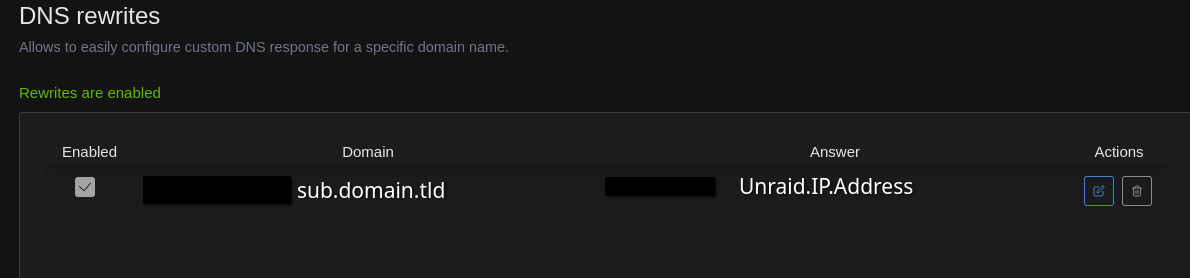
Here is the result of the curl:
21:55:55.862001 [0-x] * [READ] client_reset, clear readers
21:55:55.863057 [0-0] * Host sub.domain.tld:443 was resolved.
21:55:55.863116 [0-0] * IPv6: (none)
21:55:55.863146 [0-0] * IPv4: Unraid.IP.Address
21:55:55.863183 [0-0] * [HTTPS-CONNECT] adding wanted h2
21:55:55.863234 [0-0] * [HTTPS-CONNECT] added
21:55:55.863274 [0-0] * [HTTPS-CONNECT] connect, init
21:55:55.863330 [0-0] *   Trying Unraid.IP.Address:443...
21:55:55.863396 [0-0] * [HTTPS-CONNECT] connect -> 0, done=0
21:55:55.863447 [0-0] * [HTTPS-CONNECT] Curl_conn_connect(block=0) -> 0, done=0
21:55:55.863518 [0-0] * [HTTPS-CONNECT] adjust_pollset -> 0, 1 socks
21:55:55.863576 [0-0] * [HTTPS-CONNECT] connect -> 0, done=0
21:55:55.863625 [0-0] * [HTTPS-CONNECT] Curl_conn_connect(block=0) -> 0, done=0
21:55:55.863697 [0-0] * [HTTPS-CONNECT] adjust_pollset -> 0, 1 socks
21:55:55.863792 [0-0] * connect to Unraid.IP.Address port 443 from My.PC.IP.Address port 57824 failed: Connection refused
21:55:55.863894 [0-0] * Failed to connect to sub.domain.tld port 443 after 1 ms: Could not connect to server
21:55:55.863985 [0-0] * [HTTPS-CONNECT] connect, all attempts failed
21:55:55.864043 [0-0] * [HTTPS-CONNECT] connect -> 7, done=0
21:55:55.864094 [0-0] * [HTTPS-CONNECT] Curl_conn_connect(block=0) -> 7, done=0
21:55:55.864163 [0-0] * [HTTPS-CONNECT] Curl_conn_connect(), filter returned 7
21:55:55.864231 [0-0] * [WRITE] [OUT] done
21:55:55.864268 [0-0] * closing connection #0
curl: (7) Failed to connect to sub.domain.tld port 443 after 1 ms: Could not connect to server
Can you live with the services routing out and back into your public IP? If it all works for external users on the internet, doing nothing special should mean it works for you too?
I am willing to try almost anything! What are you thinking, like route them through a VPN or something?
Sorry I might have misunderstood, you mentioned giving others access externally and it working fine. Normally, if you’ve set up the service to be publicly accessible on the internet, you can just visit the same site through the public DNS record and your public IP. At home or elsewhere, it’s all the same internet.
So either you’ve done something odd, or you’re talking about different, more private, internal only services?
Use Unraid’s native Tailscale support. Add each Docker container to the Tailnet. You don’t need split horizon DNS when using Tailscale, as the Tailscale IPs will work both on and off your LAN, as long as you’re connected to Tailscale. Don’t use a subnet router. Tailscale is peer-to-peer, so it’s still going to connect directly over your LAN when possible (it won’t route out to the internet then back)
For TLS, you could use the Tailscale built-in
.ts.netsubdomains. Should work out-of-the-box. Otherwise, to use your own domain, f you can’t get access to Namecheap’s API you could run acme-dns instead.Would this method allow other people to connect to one of the services? Let’s say, for sake of example, it’s a blog that I want people to be able to access, but I also want to access from within my own network at the same FQDN that strangers on the internet do.
If you want to share something with just some people, they can create a Tailscale account and you can share it with them that way.
For public access, accessing it using a domain that uses your public IP should work. Most routers let you do that (“hairpin NAT”). Although to be honest, most of my public facing things are on a VPS rather than on my home server. More reliable and a higher quality internet connection for a fairly cheap price per month.
Outsiders accessing all the services via tailscale is not an acceptable solution for me. Let’s say for sake of my goal that one service is a blog that I want anyone to be able to reach.
Acronyms, initialisms, abbreviations, contractions, and other phrases which expand to something larger, that I’ve seen in this thread:
Fewer Letters More Letters AP WiFi Access Point DNS Domain Name Service/System HTTP Hypertext Transfer Protocol, the Web HTTPS HTTP over SSL IP Internet Protocol NAT Network Address Translation SSL Secure Sockets Layer, for transparent encryption TLS Transport Layer Security, supersedes SSL VPN Virtual Private Network VPS Virtual Private Server (opposed to shared hosting)
[Thread #94 for this comm, first seen 15th Feb 2026, 03:10] [FAQ] [Full list] [Contact] [Source code]
Split DNS typically refers to splitting the DNS results of a single, existing DNS server depending on who asks it, which is not what you want here, because that same server would be serving both external clients and internal ones and would need to differentiate between them.
You want an internal DNS server JUST for your own LAN, and its full-time job is very simple: to have all your local machines pointed at it for DNS, then it will either pretend it’s authoritative and return the proper local IPs for whatever name you ask it for that’s supposed to be on the local network, OR it forwards any other requests it doesn’t consider itself “authoritative” for onwards to your Adguard or other DNS provider to get a real authoritative external IP in response.
The very simplest option for a bare-bones, basic DNS server that will do what you need is dnsmasq. Here is the default sample config for reference. Simply leave all “dhcp” related settings in the config commented out and you’ll probably also want to set:
no-hosts(won’t use the /etc/hosts file)resolv-file(an /etc/resolv.conf style file that tells it what actual nameservers to use for all other queries)- and either
address=/sub.domain.tld/192.168.1.1(for the subdomain and everything under it) - or
host-record=sub.domain.tld,192.168.1.1for only that specific subdomain exactly
Then change all your local DNS servers to point at dnsmasq’s IP address (you typically would do this at whatever device is handing out IPs on your network with DHCP, for example the router)
I think that’s pretty much it.